
| Author: | George F. Crewe |
THIS ARTICLE WILL HELP YOU:
Understand Why Experiments Stop
Convert Experiments is designed to encourage testing best practices. For example, many teams wait until a test reaches their chosen confidence threshold and has run long enough to collect meaningful data before drawing conclusions.
An experience can look like it has stopped in three ways. Its status changes from Active to Completed. Its status changes to Paused. Or one or more variations are stopped while the experience keeps running.
Convert checks the rules below on a schedule, so a status can change up to about 40 minutes after the event that caused it.
These rules apply to experiments. Deploy and Rollout experiences are never completed or paused by them.
When an Experience Completes Automatically
Depending on your settings, an experience completes by itself when one of these happens:
-
Only the baseline is still running. The baseline is the Original, unless you chose another variation as the baseline. Convert completes the experience because there is nothing left to compare. This rule does not wait for the minimum running time. If the one variation still running is not the baseline, the rule does not apply.
-
The maximum running time passes. This is the Max Days setting, or the end date of a scheduled experience. A schedule's end date is saved as a number of days from the start, so the experience stops at the time of day it started, not at the end time picked. See Setting an end date for running an experiment. The minimum running time must have passed too. The experience completes by default. If you scheduled it with an end date and chose Pause experience under When end date is reached, it pauses instead.
-
A variation is a clear winner. All of these must be true: the minimum running time has passed; the variation and the baseline each have at least your Min Visitors and Min Conversions; the test is done, which for fixed-horizon tests means the planned sample size is reached and the report shows 100% progress; and the variation is ahead of the baseline. For fixed-horizon Frequentist experiments, the sample size may be based on either a Fixed or Dynamic Minimum Detectable Effect (MDE). If Keep Running Until Confidence is on (see below), the variation must also be a statistically significant winner.
When an Experience Pauses Automatically
-
The experience reaches its maximum visitor limit. This is the Max Visitors (0=Unlimited) setting in Stats & Settings, or the project's Max. Experience Visitors (0=Unlimited) setting. Convert sets the status to Paused, not Completed.
-
A scheduled experience reaches its end date and Pause experience is selected.
How Traffic Allocation Can Stop a Variation
In the app, setting a running variation's traffic to 0% stops it. This applies once the experience has been started.
-
When you save 0% for a running variation on the Experience Summary, Convert asks you to confirm. The dialog is titled Stopping Variation and says: "As the traffic to this variation is zero, we will stop this variation from running." If you set several variations to 0%, the title is Stopping Variations. After you confirm, the variation's status is Stopped.
-
If you set the traffic of the whole experience to 0%, the dialog is titled Pausing Experiment and says: "As the experiment traffic is zero, we will stop this experience and all running variations with zero traffic." The experience is paused.
-
Deploy, Multivariate and A/A experiences have no per-variation traffic fields, so this does not apply to them.
You can change the variation shares on the Experience Summary only during the experience's first 1,000 visitors. After that, the share boxes are locked and a tooltip says: "Variation Traffic Distribution is disabled for archived experiences and active ones after the first 1000 visitors". The boxes are also locked when the experience uses automatic traffic allocation, with the tooltip "Traffic allocation is automatically adjusted based on performance and cannot be manually modified." After the first 1,000 visitors, you can stop a variation from the Report tab instead.
Stopping variations can leave only the baseline running. The experience then completes at the next automation check, as described above. If you stop the last running variation from the Report tab, the experience is paused instead.
Through the API, a variation can stay running at 0% traffic. Changing a variation's traffic does not change its status, so a variation at 0% keeps the status Running and still counts as running. The rules above do not treat it as stopped. To stop a variation through the API, set its status to stopped.
When you start or resume an experience, Convert switches on only the variations that have more than 0% traffic. If all the traffic is on the baseline, only the baseline runs, and the experience completes again at the next automation check. Check the traffic split before you resume. For more on stopping and starting variations, see How Do I Stop or Start Variations During an Active Test?.
When you troubleshoot an experience that completed unexpectedly, check the variation statuses and the traffic split of each variation.
Automations
You can manage these settings from Stats & Settings in the Experience Summary.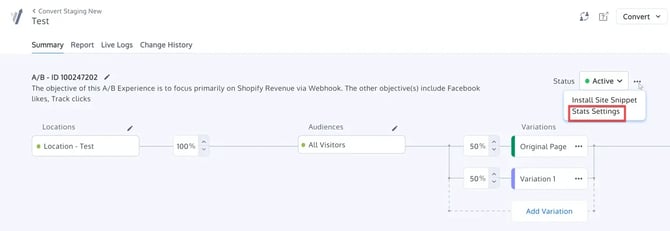
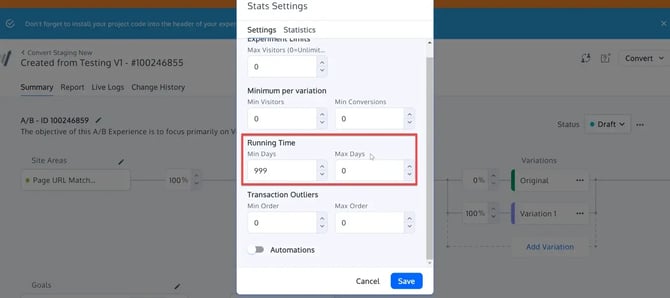
Convert includes several automation options that can affect whether an experiment keeps running or completes automatically:
1) Keep winning variations
When the experience is completed because of a winner or because the maximum running time passed, the winning variation can stay active and keep receiving traffic.
2) Stop losing variations
When a variation is statistically proven to perform worse than the baseline, Convert stops it. The experience keeps running with the remaining variations. If that leaves only the baseline running, the experience completes, as described above.
The Automations switch controls only these two options. When it is off, they are disabled. The completion rules above stay on, so an experience can still complete because of its maximum running time, a winner, or because only the baseline is running.
3) Keep Running Until Confidence
This automation helps prevent confusion when a fixed-horizon frequentist test reaches its planned sample size but has not yet reached the confidence threshold.
When this setting is enabled:
-
The experiment does not auto-complete just because progress reaches 100%
-
The experiment keeps running until the planned sample size is reached and the configured confidence threshold is met
-
If confidence has not been reached yet, the experiment continues collecting data until significance is achieved or you stop it manually
When this setting is disabled:
-
The experiment can complete automatically once the planned sample size is reached and a variation is ahead of the baseline, even if the confidence threshold has not yet been met
This behavior also applies when the required sample size was calculated using Dynamic power calculation. In that mode, reaching 100% progress means that the sample size required for the automatically projected and locked MDE has been reached. It does not necessarily mean that statistical significance has been achieved.
How Dynamic Power Calculation Can Complete an Experiment
Dynamic is the default power calculation mode for fixed-horizon Frequentist experiments. Instead of requiring you to enter a target Minimum Detectable Effect manually, Convert automatically projects an MDE for the primary goal’s conversion metric.
During an incubation period (the first 5,000 visitors per variation), Convert does not estimate an MDE. The experiment first needs enough data to make a projection.
After the incubation period, Convert uses the control variation’s daily visitor velocity to project sample sizes week by week, for up to 12 weeks. For each projected sample size, it calculates the smallest effect that can be detected at the configured significance level and statistical power.
The MDE is locked at the first projected week where the detectable effect is equal to or smaller than the currently observed lift. If no projected week meets that condition, Convert uses the 12-week projection as the fallback.
After the MDE is locked, progress is measured against the sample size required for that frozen MDE. If Keep Running Until Confidence is disabled, the experiment can auto-complete when this required sample size is reached and a variation is ahead of the baseline, even if the primary goal has not yet reached statistical significance.
For more information about how Convert projects and locks the Dynamic MDE, see Statistical Methods Used.
Tip: An unusually high observed lift shortly after the incubation period may cause the MDE to lock at a generous level, resulting in a smaller required sample size. To reduce the risk of an experiment completing earlier than expected, consider enabling Keep Running Until Confidence, setting a Minimum Running Time, or switching to Fixed power calculation mode and defining your own target MDE.
Important Notes
-
Keep Running Until Confidence is available at both the Project level and the Experiment level
-
This option is on by default for Frequentist experiments, whether or not Automations is on
-
This setting applies to fixed-horizon Frequentist experiments
-
It does not affect Sequential or Bayesian methodologies
-
Existing automation options such as Keep winning variations and Stop losing variations continue to work as expected
- Dynamic and Fixed power calculation modes affect how the required sample size and test progress are calculated. Keep Running Until Confidence determines whether reaching that sample size is enough to complete the experiment or whether the experiment must also meet the configured confidence threshold.
Turn Off Automatic Completion for a Project
The project setting Disable automatic experience completion in project stops Convert from completing experiences in that project by itself. You can find it under Project Configuration > More Settings. See Project Configuration.
With the box checked, Convert no longer completes an experience because:
-
only the baseline is still running;
-
a variation is a clear winner;
-
the maximum running time passed and the end action is Complete.
The setting does not stop the pause at the maximum visitor limit, the pause at an end date when Pause experience is selected, or Stop losing variations.
Why an Experiment May Complete Earlier Than Expected
If your experiment completed and you did not expect it to, review the following:
-
Was a maximum running time or a scheduled end date configured?
-
Did a variation already meet your confidence threshold?
-
Was Stop losing variations on, so that losing variations were stopped automatically?
-
Did you set a running variation to 0% traffic? Saving it stops the variation.
-
Was the baseline the only variation still running?
-
Did you resume the experience while all the traffic was on the baseline?
-
Was Keep Running Until Confidence off, allowing the experiment to complete once the planned sample size was reached?
-
Was Dynamic power calculation enabled, and did the experiment reach the required sample size calculated from the locked MDE?
-
Could the observed lift have been temporarily inflated when the Dynamic MDE was locked, resulting in a smaller-than-expected required sample size?
If the experience stopped because its maximum visitors limit was reached, its status will be Paused rather than Completed.
If you want your fixed-horizon frequentist experiment to continue beyond 100% progress until the confidence threshold is reached, make sure Keep Running Until Confidence is enabled.
You can also set a Minimum Running Time to prevent completion before a specified duration, or use Fixed power calculation mode if you prefer to define the target MDE yourself.
Restarting Your Experiment
Before restarting an experiment, review your Automation Settings first. Otherwise, the same conditions may cause it to complete again.
If the experience was paused because it reached its maximum visitors limit, review the maximum visitors setting before activating it again.
Also review the selected power calculation mode and the experiment’s current progress. If Dynamic mode caused the experiment to reach its required sample size, restarting it without changing the relevant settings may cause it to complete again.
Check the traffic split of the variations too. When you start or resume an experience, Convert switches on only the variations that have more than 0% traffic. If all the traffic is on the baseline, only the baseline runs, and the experience completes again at the next automation check.
The minimum and maximum running times count again from the moment you restart.
To restart your experiment:
-
Open the experience and go to the Experience Summary
-
Next to Status, open the dropdown. It shows Completed or Paused
-
Choose Active
The status changes right away, and there is no separate button to click. If a pop-up appears, for example about archived goals, follow it to finish.
Best Practice
Before launching or restarting an experiment, review:
-
Minimum and maximum running time
-
Maximum visitors
-
Confidence threshold
-
Whether losing variations should stop automatically
-
Whether the experiment should keep running until confidence is reached
-
Whether Dynamic or Fixed power calculation is appropriate for the experiment
-
The target MDE, when using Fixed power calculation
-
The traffic split of each variation, so that more than the baseline gets traffic
-
Whether Disable automatic experience completion in project is set for the project
These settings help make experiment behavior more predictable and better aligned with your testing goals.