
THIS ARTICLE WILL HELP YOU:
- Get an Overview
- Know what it is
- Understand Key Concepts
- Learn How it Works
- See some Examples
- Understand Some Use cases
- Know Supported Environments
- Know What It Doesn't Do.
- Learn some Best Practices
⚠️ Note:
This article explains Features conceptually. For SDK setup, API references, feature evaluation methods, variables, and platform-specific examples, refer to the Convert Developer Documentation: https://docs.developers.convert.com/docs/feature-flags
Overview
A Feature in Convert Fullstack is like a remote control for your application. It lets your team decide what a visitor or user should see or receive without hardcoding every decision into your app.
For example, a Feature can help you:
- Turn a new dashboard ON or OFF
- Show a blue button to one group and a green button to another
- Roll out a new checkout flow to only 10% or 20% of users
- Return dynamic values, such as product lists, labels, layout settings, prices, or JSON configuration
Features are available for Fullstack projects and are used by the Convert SDK in your application code. Convert’s JavaScript SDK supports feature tests, feature flags, and feature rollouts for Node.js and browser-based JavaScript applications.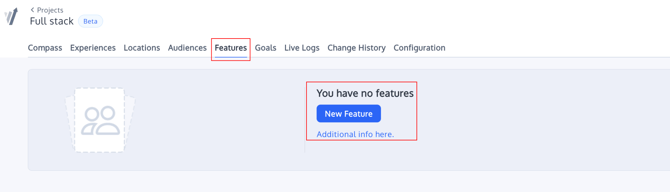
What Is a Feature?
A Feature is a named configuration item that your app can ask Convert about.
A simple Feature could look like this:
Feature name: Beta Dashboard
Feature key: beta_dashboard_enabled
Variable: enabled = true or false
Your application then checks the Feature value:
beta_dashboard_enabled = true  → show the new dashboard
beta_dashboard_enabled = false → show the old dashboard
In Convert Fullstack, Features are variables created in the Convert interface and read by the SDK. Supported variable types include boolean, integer, string, float, and json.
Key Concepts
Feature Flags
A feature flag is an ON/OFF control for a part of your application.
Use feature flags when you want to:
- Release a feature to a small group first
- Quickly disable a feature if something goes wrong
- Separate code deployment from feature release
- Let product teams control exposure without another code deployment
Example:
new_checkout_enabled = true
Variables
Variables are dynamic values attached to a Feature. Your app reads these values and decides how to behave.
Examples:
button_color = "blue"
headline_text = "Try the new dashboard"
max_items = 4
products = {
 "jacket": {
   "title": "Jacket",
   "price": "$25"
 }
}
Variables can be simple values like strings and booleans, or structured JSON values such as product lists or configuration objects.
Variations
A variation lets you test different Feature values with different users.
Example:
Variation A → button_color = "blue"
Variation B → button_color = "green"
Your app asks the SDK which variation the user belongs to, then displays the correct value.
Convert’s SDK can run experiences and return the selected variation based on configured rules, locations, audiences, and traffic allocation.
Gradual Rollouts
A gradual rollout exposes a Feature to only a percentage of users.
Example:
20% of users → Special Deals enabled
80% of users → Special Deals disabled
This is useful when you want to reduce risk, monitor behavior, and increase exposure over time.
The Convert SDK tutorial includes a Feature called Special Deals, with key special-deals, a JSON variable called products, and a variation exposed to 20% of visitors.
How Features Work
At a high level, the workflow is:
- Create a Feature in Convert.
- Add a name, key, and variables.
- Create a Fullstack experience or rollout that uses the Feature.
- Define variations and traffic allocation.
- Install and initialize the Convert SDK in your application.
- Create a user context with a stable user ID.
- Ask the SDK which Feature and values apply to that user.
- Use the returned status and variables in your application code.
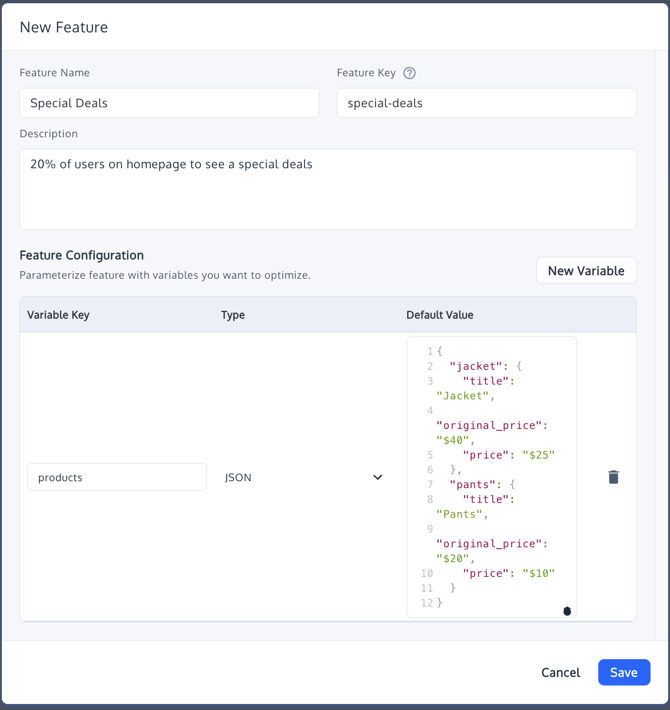

Fullstack projects allow experimentation across frontend and backend components, including user interface, business logic, and database interactions.
Example: Special Deals Feature
Suppose you want only 20% of users on your homepage to see a special deals section.
You could create:
Feature name: Special Deals
Feature key: special-deals
Variable: products
Variable type: JSON
Example JSON value:
{
 "jacket": {
   "title": "Jacket",
   "original_price": "$40",
   "price": "$25"
 },
 "pants": {
   "title": "Pants",
   "original_price": "$20",
   "price": "$10"
 }
}
Your app can then call the SDK:
const bucketedFeature = sdkContext.runFeature('special-deals', {
locationProperties: { location: 'homepage' }
});

if (bucketedFeature?.status === 'enabled') {
const products = getProductsVariable(bucketedFeature);

if (products) {
// Render the special deals section using products
}
}
Note: Depending on the SDK version and implementation, Feature variables may be returned either as a keyed object or as an array of { key, value } pairs. Refer to your SDK documentation for the exact variable access pattern.
The SDK’s runFeature() method retrieves a single Feature for the user based on the Feature key, and can accept location and visitor properties.
Practical Use Cases
1. Beta Rollout
Release a new dashboard, checkout, search experience, or pricing page to a limited audience before making it available to everyone.
Example:
beta_dashboard_enabled = true
Start with 5%, then increase to 25%, 50%, and 100% after QA and monitoring.
2. UI Testing
Test design or content changes without creating separate application builds.
Example:
button_color = "blue"
button_color = "green"
cta_text = "Start Free Trial"
cta_text = "Get Started"
This is useful for product and CRO teams that want to test interface changes while development teams keep the app logic controlled in code.
3. Personalization
Return different values for different users, audiences, or contexts.
Example:
products = JSON list of recommended products
headline = "Welcome back"
layout = "compact"
Your app can use these values to show different content, offers, or layouts to different user groups.
4. Backend or Business Logic Testing
Use Features to test logic that happens before the page is rendered, such as:
- Subscription plan presentation
- Checkout rules
- Search ranking logic
- Recommendation algorithms
- API behavior
Convert Fullstack can be used with backend logic, server-side variation handling, and application-level experimentation.
Supported Applications and Environments
Features are available in Convert Fullstack projects and can be used across client-side, server-side, mobile, and backend applications through Convert SDKs.
Supported environments include:
- JavaScript web applications and modern frontend frameworks (React, Vue, Angular, etc.)
- Node.js applications
- PHP applications
- Ruby applications
- Android applications
- Other environments supported through Convert Fullstack SDKs
Convert Fullstack supports environment-based configuration, allowing Features to be managed separately across environments such as staging and production.
Sources:
SDK Keys and Security
Before using Features in your app, you need an SDK key from your Fullstack project.
Use:
- Public SDK keys for browser or client-side JavaScript
- Authenticated SDK keys only in secure server-side or edge environments
Do not expose SDK secrets in the browser.
What Features Do Not Do
Features are powerful, but they are not a replacement for all application logic.
Features do not:
- Automatically change your UI without application code reading the SDK result
- Replace proper authentication, authorization, or permission checks
- Deploy code to your application
- Create database migrations or backend infrastructure changes
- Guarantee a user sees a change unless your app implements the returned Feature values
- Replace QA before launch
- Persist bucketing by themselves unless your implementation uses a stable user ID or a configured DataStore
The SDK requires a unique user context, and stable user IDs help keep feature and variation bucketing consistent as long as the configuration does not change.
Best Practices
Use clear, stable Feature keys, such as:
special-deals
beta-dashboard
new-checkout-flow
Keep fallback behavior in your application in case the Feature is missing, disabled, or unavailable.
Start with a small rollout percentage for high-impact changes.
Use staging before production when testing SDK configuration and Feature values.
Use a stable user ID for consistent bucketing.
Avoid exposing SDK secrets in client-side code.
Test every Feature path before increasing rollout traffic.
FAQs
Is a Feature the same as an A/B test?
Not exactly. A Feature is the configuration or flag your application reads. An A/B test or rollout decides which users receive which Feature status or variable values.
Can I use JSON values?
Yes. Features support JSON variables, which are useful for structured data such as product lists, recommendation settings, layout configuration, or grouped content values.
Can I show a Feature to only a percentage of users?
Yes. You can use traffic allocation in the related Fullstack experience or rollout to expose the Feature to a percentage of users, such as 10%, 20%, or 50%. The Special Deals tutorial demonstrates a Feature shown to 20% of visitors.
Can I use Features on the backend?
Yes. Convert Fullstack supports server-side and backend experimentation through SDK-based implementations, especially in Node.js environments.
Summary
Features in Convert Fullstack let product and development teams safely control application behavior using flags, variables, variations, and gradual rollouts.
Use Features when you want to:
- Release safely
- Test application behavior
- Personalize experiences
- Roll out functionality gradually
- Control frontend or backend behavior through the SDK
They are best used together with good development practices, stable user IDs, clear fallback behavior, and proper QA.