
| Author: | Amrin Ramani |
IN THIS ARTICLE YOU WILL:
- Know What the Feature is
- Understand Who This Is Useful For
- Know Why it Exists
- Learn How to Access it
- Browse the Roadmap
- Check Existing Ideas and Requests
- Know How to Submit a Request/Feedback
- Track Progress
- Get Some Tips
1. What This Is
Convert now has a public roadmap where you can:
- See what we’re planning, what’s in progress, and what we’ve shipped
- Share feature requests and product feedback
- Vote and comment on ideas from the community
You can view it anytime at:
This isn’t a single feature launch — it’s a transparency system for how we build Convert alongside our customers.
2. Who This Roadmap Helps
2.1 E-commerce Experimenters
You often need to know:
- What feature improvements are coming
- How integrations and reporting will evolve
- Whether it’s safe to invest time in new experiment setups
With the public roadmap, you can:
- See what’s planned before you redesign a funnel around it
- Track progress of the features you rely on
- Vote on improvements that matter most to your store and team
2.2 Frustrated Developers
You care about predictability and avoiding rework:
- You don’t want to build workarounds for something that’s already planned
- You need clearer product direction to plan tech debt and refactors
With the public roadmap, you can:
- Check status before committing engineering effort
- Understand product direction and upcoming capabilities
- Submit technical feedback directly (edge cases, SDK needs, full-stack requests, etc.)
2.3 Agencies
You manage multiple clients and need vendor alignment:
- Roadmap visibility is crucial for planning experiments
- Clients expect transparency on tools you recommend
With the public roadmap, you can:
- Show clients the real roadmap status directly
- Align experimentation strategy with upcoming features
- Use roadmap links in decks, audits, and QBRs to build trust
Why This Exists
Why it exists
- To improve transparency about where Convert is headed
- To create a clearer feedback loop between customers, partners, and our product team
- To strengthen trust by showing not just what we launched, but what we’re considering and actively building
What this isn’t
- The roadmap shows direction, not promises
- Votes help prioritize, but they do not guarantee delivery
- Not every idea will be built — some may be declined or merged into broader initiatives
4. How to Access the Public Roadmap
You can access the roadmap in two ways:
4.1 From the in-app Support Icon (recommended)
- Log in to your Convert account.
- Click the support icon/chat bubble in the bottom-right corner of the app.
- In the messenger, look for the card labeled: “Feature request? Help us build what’s next”
- Click Give feedback.
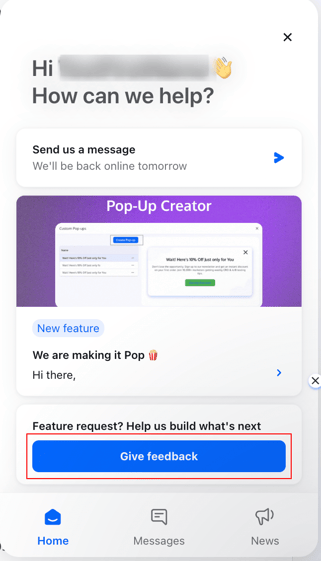
This will open the feedback portal where you can:
- Browse existing requests
-
- Vote on ideas
-
- Create a new feature request
4.2 Directly from Your Browser
You can also go straight to:
From there you’ll see two main sections:
- Roadmap – high-level view of what’s planned, in progress, and complete
- Feedback – the place to submit ideas and vote
5. Browsing the Roadmap
On the Roadmap tab you’ll see columns such as:
- Planned – accepted ideas we intend to build
- In Progress – features the team is actively working on
- Complete – improvements and features that have shipped
Click any card to:
- Read the full description
- See the current status (e.g. Planned, In Progress, Complete)
- Check votes and comments
- Add your own comment or question
6. Checking for Existing Ideas & Voting
Before adding a new request, it helps to see if someone already suggested it.
- Go to the Feedback board: https://convert.canny.io/feedback
- Use the Search bar to type keywords (e.g. “custom domain”, “Shopify price testing”, “preview options”).
- If a matching idea exists:
- Open the post
- Click the up-vote arrow to show support
- (Optional) Add a comment with your use case, context, or examples
The more people vote and share real scenarios, the easier it is to prioritize work that has the biggest impact.
7. Submitting a New Feature Request or Feedback
If you don’t find an existing post that fits your idea:
- Open the Feedback board (via the support icon or directly at https://convert.canny.io/feedback).
- On the right side you’ll see a form with:
- Title – short, descriptive summary
- Details – explanation of what you need
- Category – type of request
7.1 Title
Keep it concise and specific, for example:
- “Make the ‘Create Experience’ button more visible”
- “Support for multiple reporting timezones”
- “Enhanced GA4 integration filters”
7.2 Details
Include:
- What you’re trying to achieve (the job to be done)
- Where in Convert this affects you (which screen, which step)
- Why it’s important (impact on workflow, team, or revenue)
- Any frequency/urgency info (e.g. “daily”, “blocks client rollout”)
Example:
“Our team adds new tests daily and new teammates struggle to find where to start. The ‘Create Experience’ button is easy to miss in the header. Making it more prominent would speed up onboarding and reduce support questions.”
7.3 Category
Choose the most relevant category (e.g. UX/UI, Platform, Full-Stack, Integrations, etc.) so the right product area sees your request.
- Click Create Post to publish your idea.
Your request will now be visible for others to up-vote and comment on.
8. Tracking Progress on Your Requests
Once your idea is posted:
- The Convert team will review it and may ask clarifying questions.
- If accepted, it may move into the Roadmap under Planned.
- As it moves forward, you’ll see it progress to In Progress and then Complete.
- If you voted for or commented on a post, you’ll receive email updates from Canny whenever its status changes.
You can revisit the roadmap at any time to see:
- What’s coming soon
- What’s currently being built
- What has already shipped
9. Tips for Writing High-Impact Requests
To give your idea the best chance of being understood and prioritized:
- Focus on the problem, not just a specific UI solution
- Share who is impacted (e.g. “all non-technical marketers”, “developers maintaining our integration”)
- Call out business impact (e.g. “blocks us from launching X tests per month”, “adds manual work during weekly reports”)
- If relevant, mention dependencies like third-party tools, SDKs, or APIs
10. Need Help?
If you run into issues using the roadmap or have account-specific questions that aren’t feature requests (e.g. billing, experiment debugging, integration errors), please contact our support team—either via the in-app chat or by email at support@convert.com.
We can help troubleshoot and, where appropriate, also turn recurring issues into roadmap items.
That’s it! Use the public roadmap to see where Convert is headed, influence what we build next, and keep your team and clients aligned with upcoming improvements.