
| Author: | George F. Crewe |
THIS ARTICLE WILL HELP YOU:
Understand Why Experiments Stop
Convert Experiments is designed to encourage testing best practices. For example, many teams wait until a test reaches their chosen confidence threshold and has run long enough to collect meaningful data before drawing conclusions.
An experiment may appear to have “stopped” because its status changed from Active to Completed, because individual variations were paused automatically, or because a maximum runtime or visitor limit was reached.
Depending on your settings, an experiment can complete automatically when one of the following happens:
-
The experience reaches its maximum visitor limit separately from automatic completion. When the maximum visitors limit is reached, the experience is automatically set to Paused, not Completed.
-
The minimum running time and maximum running time conditions are both met
-
A variation winner is detected after the minimum running time is met
-
All losing variations are stopped and only the winning experience remains active
-
The required sample size is reached and your automation settings allow the test to complete. For fixed-horizon Frequentist experiments, this sample size may be based on either a Fixed or Dynamic Minimum Detectable Effect (MDE).
Automations
You can manage these settings from Stats & Settings in the Experience Summary.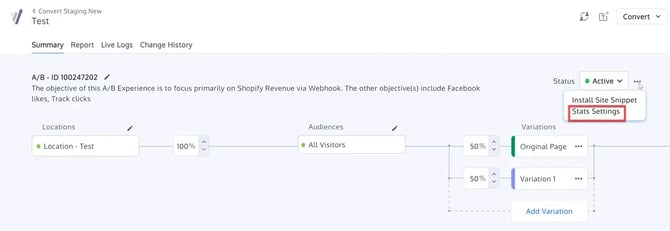
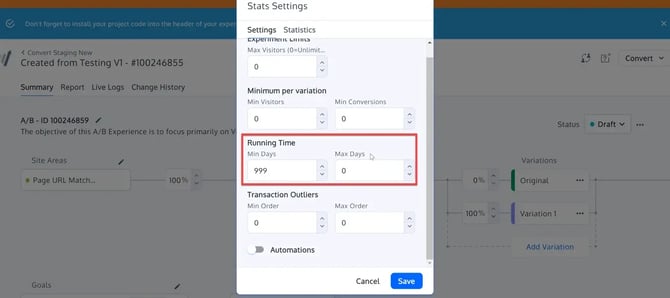
Convert includes several automation options that can affect whether an experiment keeps running or completes automatically:
1) Keep Winning Variation Running
When the experiment is marked as completed, the winning variation can remain active and continue receiving traffic.
2) Stop Losing Variations
When a variation is identified as performing worse than the others with sufficient confidence, it can be stopped automatically and its traffic redistributed across the remaining active variations.
3) Keep Running Until Confidence
This automation helps prevent confusion when a fixed-horizon frequentist test reaches its planned sample size but has not yet reached the confidence threshold.
When this setting is enabled:
-
The experiment does not auto-complete just because progress reaches 100%
-
The experiment keeps running until the planned sample size is reached and the configured confidence threshold is met
-
If confidence has not been reached yet, the experiment continues collecting data until significance is achieved or you stop it manually
When this setting is disabled:
-
The experiment can complete automatically once the planned sample size is reached, even if the confidence threshold has not yet been met
This behavior also applies when the required sample size was calculated using Dynamic power calculation. In that mode, reaching 100% progress means that the sample size required for the automatically projected and locked MDE has been reached. It does not necessarily mean that statistical significance has been achieved.
How Dynamic Power Calculation Can Complete an Experiment
Dynamic is the default power calculation mode for fixed-horizon Frequentist experiments. Instead of requiring you to enter a target Minimum Detectable Effect manually, Convert automatically projects an MDE for the primary goal’s conversion metric.
During an incubation period—the first 5,000 visitors per variation—Convert does not estimate an MDE. The experiment first needs enough data to make a projection.
After the incubation period, Convert uses the control variation’s daily visitor velocity to project sample sizes week by week, for up to 12 weeks. For each projected sample size, it calculates the smallest effect that can be detected at the configured significance level and statistical power.
The MDE is locked at the first projected week where the detectable effect is equal to or smaller than the currently observed lift. If no projected week meets that condition, Convert uses the 12-week projection as the fallback.
After the MDE is locked, progress is measured against the sample size required for that frozen MDE. If Keep Running Until Confidence is disabled, the experiment can auto-complete when this required sample size is reached, even if the primary goal has not yet reached statistical significance.
For more information about how Convert projects and locks the Dynamic MDE, see Statistical Methods Used.
Tip: An unusually high observed lift shortly after the incubation period may cause the MDE to lock at a generous level, resulting in a smaller required sample size. To reduce the risk of an experiment completing earlier than expected, consider enabling Keep Running Until Confidence, setting a Minimum Running Time, or switching to Fixed power calculation mode and defining your own target MDE.
Important Notes
-
Keep Running Until Confidence is available at both the Project level and the Experiment level
-
When Automations are turned on, this option is intended to be enabled by default
-
This setting applies to fixed-horizon Frequentist experiments
-
It does not affect Sequential or Bayesian methodologies
-
Existing automation options such as Keep Winning Variation Running and Stop Losing Variations continue to work as expected
- Dynamic and Fixed power calculation modes affect how the required sample size and test progress are calculated. Keep Running Until Confidence determines whether reaching that sample size is enough to complete the experiment or whether the experiment must also meet the configured confidence threshold.
Why an Experiment May Complete Earlier Than Expected
If your experiment completed and you did not expect it to, review the following:
-
Was a maximum running time configured?
-
Did a variation already meet your confidence threshold?
-
Was Stop Losing Variations enabled, causing losing variations to be paused automatically?
-
Was Keep Running Until Confidence disabled, allowing the experiment to complete once planned sample size was reached?
-
Was Dynamic power calculation enabled, and did the experiment reach the required sample size calculated from the locked MDE?
-
Could the observed lift have been temporarily inflated when the Dynamic MDE was locked, resulting in a smaller-than-expected required sample size?
If the experience stopped because its maximum visitors limit was reached, its status will be Paused rather than Completed.
If you want your fixed-horizon frequentist experiment to continue beyond 100% progress until the confidence threshold is reached, make sure Keep Running Until Confidence is enabled.
You can also set a Minimum Running Time to prevent completion before a specified duration, or use Fixed power calculation mode if you prefer to define the target MDE yourself.
Restarting Your Experiment
Before restarting an experiment, review your Automation Settings first. Otherwise, the same conditions may cause it to complete again.
If the experience was paused because it reached its maximum visitors limit, review the maximum visitors setting before activating it again.
Also review the selected power calculation mode and the experiment’s current progress. If Dynamic mode caused the experiment to reach its required sample size, restarting it without changing the relevant settings may cause it to complete again.
To restart your experiment:
-
Go to the Experience Summary
-
In the Status section, click the Completed dropdown
-
Change the status back to Active
-
Click Activate Experience at the bottom right of the page
Best Practice
Before launching or restarting an experiment, review:
-
Minimum and maximum running time
-
Maximum visitors
-
Confidence threshold
-
Whether losing variations should stop automatically
-
Whether the experiment should keep running until confidence is reached
-
Whether Dynamic or Fixed power calculation is appropriate for the experiment
-
The target MDE, when using Fixed power calculation
These settings help make experiment behavior more predictable and better aligned with your testing goals.