
THIS ARTICLE WILL HELP YOU:
Project definition
A project is a way of creating a subsection in your Convert account. Each project has its own snippet, set of experiments, and set of collaborators. Projects are designed to help you organize your experiments across multiple sites (or different sections of large sites). The hierarchy of experiment organization looks like this:
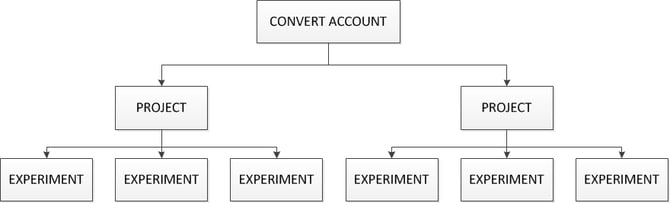
With projects, you can group your experiments in ways that make sense for your organization. For example, if you run experiments on multiple domains, you can assign a unique project for each domain. You can also invite other users to collaborate on a project without allowing them complete access to your account.
Things to know before creating a Project
Some things you need to know about how a project behaves:
- Each project has a unique JavaScript code, this code splits the databases of clients and ensures website visitor information is private and never reusable in another project.
- A project can contain multiple experiences and goals, but the number that can be Active at the same time may be limited by your Convert plan.
- Only experiences in Active status count toward the active-experience limit. You can still create and save additional experiences as Drafts without them counting toward that limit.
- If you try to activate an experience after reaching the active-experience limit for the project, Convert displays a quota message indicating that the maximum number of active experiments for that project has been reached.
- Active-goal limits also apply per project. Archived goals do not count toward the active-goal limit.
- If you reach the active-goal limit, you will need to archive an existing goal or otherwise reduce the number of active goals before adding another one.
- For the current active experience, active goal, project, and domain limits for each plan, see the Convert pricing page.
- Inside a Project, an experiment can include websites with different domains as long as the same JavaScript code is pasted in the header of each website inside the project.
- When a project is deleted all data will be purged from our servers within 7 days and is unrecoverable after that time.
- When a project is deleted the visitor cookies will be unable to reconnect to any new project you set up on the same domain.
- Each plan has a maximum number of projects you can create. For reference please check here.
Create a new Project
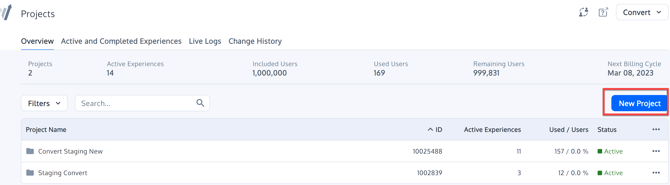
Users that have already purchased a subscription for Convert, can simply click on the "New project" button to initiate a new project and fill in the project name and domain URL
If you are logging in to the app after singing up for the trial, you will be re-directed to the project screen where you will see a modal as show in the screenshot below.
In order to create a new project, you need to select the last option "Create a New Project" and then click continue. On the next screen you need to enter the Project Name and Project Main Domain. You can also customize other project settings in that screen.
As a trial user, you may also explore the demo project and its summaries and reports to understand how the tool works better.
Congratulations! You have now created you first project with Convert.