
When you set the pages where an experience runs (its location), three conditions look at the page address: Page URL, Page URL (With Query) and Query string. They differ in how they treat the query string, the part of the address after the question mark, such as ?pageID=140&utm_source=newsletter. This article explains which one to pick.
What you can do after reading this article
- Pick the right URL condition
- Match a page whatever its query string
- Match one exact address, query string included
- Match a parameter in the query string
- Check a parameter's value with a JS Condition
- Fix a location that doesn't match
Pick the Right URL Condition
In the location editor, open the Advanced tab. The three URL conditions are in the Content group of the Conditions list.
| Condition | What Convert compares | Use it when |
|---|---|---|
| Page URL | The address without its query string | The page should match whatever query string it has |
| Page URL (With Query) | The full address, including the query string | Only one exact address should match |
| Query string | Only the text after the question mark, as it appears in the address | A parameter decides, whatever the page |
Matching ignores upper and lower case. The same three conditions are available in Advanced goals, and in audiences of the Segmentation type.
Match a Page Whatever Its Query String
Use Page URL. For example, Page URL Matches exactly https://www.example.com/index.php matches all of these:
https://www.example.com/index.phphttps://www.example.com/index.php?pageID=140https://www.example.com/index.php?utm_source=newsletter&gclid=abc
When your value is a full address starting with http, a trailing slash follows what you enter: if your value ends with /, Convert adds one to the visitor's address before comparing, and if it doesn't, Convert removes it. The protocol is compared as entered, so a value that starts with http:// doesn't match https:// pages. To cover both, use Contains www.example.com/index.php.
Match One Exact Address, Query String Included
Use Page URL (With Query). Matches exactly https://www.example.com/index.php?pageID=140 matches only that address. It doesn't match https://www.example.com/index.php, and it doesn't match the same page when anything else is in the query string, such as ?pageID=140&utm_source=newsletter or the same parameters in a different order.
Visitors often arrive with tracking parameters added by ads or emails, so exact matching on the full address can leave them out. When one parameter is what matters, use the Query string condition instead.
Match a Parameter in the Query String
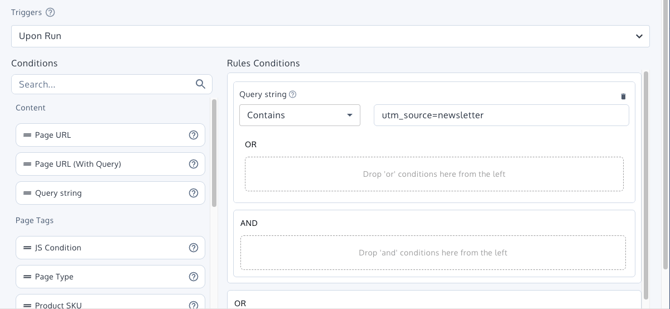
Use Query string. For https://www.example.com/index.php?pageID=140&utm_source=newsletter, Convert compares only pageID=140&utm_source=newsletter.
- Contains
utm_source=newslettermatches every page whose query string includes that parameter, wherever it sits. - Contains also matches longer values:
pageID=14matchespageID=140too. To match one parameter value exactly, use Matches regex exactly with(^|&)pageID=140(&|$). - The query string is compared as it appears in the address, before decoding. A space can appear as
%20or+, so match the form your links use.
To combine a page and a parameter, add Page URL and drop Query string into its AND box.
Check a Parameter's Value with a JS Condition
For anything the conditions above can't express, use JS Condition, in the Page Tags group of the same list. Enter a JavaScript expression that is true on the pages where the experience should run. This one is true when the pageID parameter is exactly 140, whatever else is in the address:
new URLSearchParams(window.location.search).get('pageID') === '140'
If the expression throws an error, Convert treats the condition as false. The other conditions in the Page Tags group use page tags and depend on your plan; see Convert pricing.
Fix a Location That Doesn't Match
- The page has extra parameters. With Page URL (With Query) and Matches exactly, any extra parameter (for example
utm_sourceorgclid) stops the match. Switch to Page URL or Query string. - http or https, www or not. Matches exactly compares the whole address. Copy the address from the browser, or use Contains with the part that doesn't change.
- The address has a fragment. With Page URL (With Query) and Matches exactly, a fragment such as
#reviewsat the end of the address also stops the match. Use Contains, Page URL or Query string instead. - A shorter value matches too much. Contains
id=1also matchesid=10andproductid=1. Use the regular expression above.
To see which location rules matched on a page, use the Chrome Debugger Extension For Convert Experiences.