
THIS ARTICLE WILL HELP YOU:
Over-Quota Charges
As visitors participate in the experiences being run on your website, tested users are being used. Each visitor is only counted once during the billing period, even if they may participate in many experiences.
Convert plans come with a specific number of tested users. This means that after the included visitors quota is reached, the experiences will be paused by default.
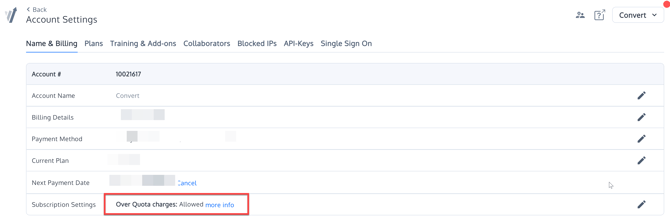
If you want your experiences to continue running after the included tested-user quota is reached, you can enable Over-Quota Usage in your subscription settings. Additional tested users will then be billed according to the current overuse pricing for your plan.
Simply allow or disable the subscription setting per your needs by going to your Account -> Name & Billing -> Subscription settings and select the option you prefer.
For the latest over-quota pricing, see the Convert pricing page.
If you want to continue testing but don't want over-quota charges or a paused account, we recommend you upgrade your plan. We don't automatically upgrade plans without your request.
Note: Even with this setting on, if you test on extremely high-traffic sites, it's still possible to get over quota charges. Due to its distributed nature, it takes time to propagate changes through the infrastructure and therefore, projects will be stopped slightly after the quota was reached (up to one hour)
Winning Variations, Deployments and Over Quota
Note that when you have a winning variation in an experience that continues running, visitors to the winning variation will continue to contribute to your quota. In this case, we recommend converting the Winning Variation to a Deploy, which has no limits on visitors.
Read more about Deployments.
Keywords: extra tested visitors, upgrade, quota, plan, billing, charges